
MilkyWay@home screensaver coming soon
Message boards :
News :
MilkyWay@home screensaver coming soon
Message board moderation
Previous · 1 · 2
| Author | Message |
|---|---|
 Send message Joined: 2 May 10 Posts: 57 Credit: 2,138 RAC: 0   |
"Pictures are interesting, but for a user like myself, don't really understand what the wedges are. I'm guessing #1 is a wedge of space as seen from earth, thin at the centre and wide (rectangle) on the rim, and not like a cheese wedge, where it's just as thick at the centre as it is on the rim. Meanwhile, #2 is the wedge rectangle view as seen as from earth, and not like the cheese wedge seeing the rectangle from centre of circle to edge of circle." These are great questions. I will try to answer them while giving a concise overview of the project. One of the aims of the MilkyWay@Home project is to analyze star density over specific regions to help find likely stream locations. Finding streams gives clues to the structure and origin of the Milky Way Galaxy. The sky "wedges" used to find these structures are taken from the Sloan Digital Sky Survey (SDSS). Only the F-class stars in the wedges are used for density surveys because they present the least amount of error when calculating star distances. Each time a computer that is signed up with the MilkyWay@Home project takes on a job, it analyzes a single stripe across the sky, or wedge, taken from the SDSS survey (wedge 82 is shown in the above images). SDSS names the wedges by number. The wedges are completely flat in the Earth-view image. The curves seen in the map below are due to the curvature of the graph. The SDSS telescope scans a uniform portion of the sky while panning across a wedge. This size is limited by the width of the lens and the amount of magnification. The "over-head view" shows what the wedge would look like if you traveled about 1 million light-years away from Earth and looked back on only the stars seen in that wedge. They have a curve to them at this angle because the telescope can only see F-class stars that are about 150,000 light years away. Stars beyond this are dimmer than the SDSS telescope is able to make out.  SDSS Telescope (image from SDSS) 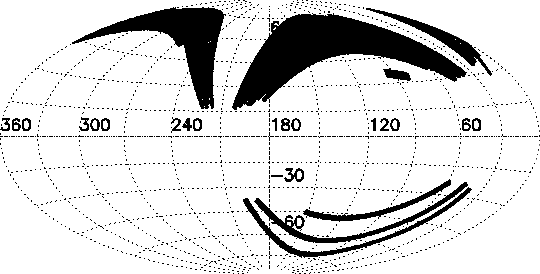 SDSS Wedges displayed in galactic coordinates - wedge 82 is one of the bottom 3 stripes (image from SDSS) Have you looked at Einstein @ home? it has an interesting idea of showing where it's doing calculations in the sky, but it is only one view, while yours sounds very ambitious with 3 views in it. Einstein@home uses constellations to help visualize galactic positions. The MilkWay@Home screensaver shows multiple angles using Cartesian coordinates. The intention is to allow users to visualize: where the wedges originated from, what the data actually represents on a galactic scale, and how the integration process is applied to the data. For more information on the project, Matthew Newby has assembled an MS PowerPoint slideshow that can be accessed here. |
|
Send message Joined: 4 Jun 09 Posts: 45 Credit: 447,355 RAC: 0  
|
To be honest I was hoping something like the Einstein@home screensaver would show up for Milkyway@home..this new screensaver doesn't look very exciting to have on a screen..although it is something I guess. Will the people on Milkyway GPU have the screensaver option also? I imagine they could use their CPU alot more for the screensaver. And does the screensaver take live data that is being crunched or already crunched or just showing random things on screen? Edit: Can you upload a video sample of the screensaver? |
|
Send message Joined: 2 May 10 Posts: 57 Credit: 2,138 RAC: 0 |
"To be honest I was hoping something like the Einstein@home screensaver would show up for Milkyway@home..this new screensaver doesn't look very exciting to have on a screen..although it is something I guess." Thank you for the feedback. I am glad to hear from so many people as determined as I am to make an interesting screensaver for MilkyWay@Home. I will do my best to answer your questions while giving a recap of everything proposed so far: What sets this screensaver apart from Einstein@home and similar simulations: The emphasis in this screensaver has been to show application progress while keeping a space theme and showing a realistic view of the stars. The stars are rendered using incremental Gaussian blurs (star-blurs that brighten when overlapped) instead of pixel-discs (which are used in most modeling apps including Einstein@home). The result is intended to resemble a photograph from a telescope. Look-up tables allow this effect to be done with nearly no additional CPU overhead over that of pixel-discs. By comparison, applications using similar blur effects without look-up tables, color optimizations, or GPU acceleration render 100,000 stars at about 1.5 fps on my machine using 100% of the CPU, hence the need for pixel-discs. This library does the same job without GPU acceleration at 54 fps. When you say "something like the Einstein@home screensaver," what features were you interested in? "...does the screensaver take live data that is being crunched or already crunched or just showing random things on screen?" Features: The plan for the screensaver as is, is to alternate between 3 types of views. The first would show a far-off view of the wedge at random to put things into perspective and keep pixels from burning into the screen (always helpful for CRT's). This is where a Milky Way model could be shown in the background if people are interested. The second view would pan across the wedge as it is seen from Earth to give a realistic perspective of what it would look like if the viewer were able to see every star in the wedge from our solar system. The third would be the progress indicator: a top-down view of the wedge that shows progress by dimming stars sections that are completed and flickering stars that are being calculated. It will also have progress indicators and coordinates printed in the corner of the screen at this view. Below is a screenshot of the Milky Way from Celestia. Celestia uses similar techniques to render the Milky Way as those that would be used in the MilkyWay@Home screensaver.  (taken from Celestia application) "Will the people on Milkyway GPU have the screensaver option also? I imagine they could use their CPU alot more for the screensaver." The original plan was to allow flying trough the wedge, but given only 1% CPU overhead, this is not plausible for most machines. The application requires 2% of the CPU per frame each second for a 3GHz processor. From what I understand, only a few percent of the CPU is used to process MilkyWay@home data for those with double precision multi-threading GPU's. This would mean that the screensaver could fly around at at least 30 fps without effecting the work-load at all if you have this type of GPU. If people are interested, I can add this functionality for machines capable of using it. "Edit: Can you upload a video sample of the screensaver?" Yes, but perhaps it would be better to upload demo applications for Linux, Mac and Windows so that everyone can see what this version of the screensaver would look like on their machines. I can make this available relatively soon along with a link to the code used if people are interested. Another option is to put the screensaver in the main application as-is and see what people think of it at each phase. I think a demo might be best for now though since integration may take somewhat longer. In addition to the Milky Way as a background and the status indicators, I am interested in hearing whether or not people feel that adding movement for computers that are able to handle the load would be more appealing. As for other suggestions, the means are likely available to implement most ideas for the photo-switching version of the screen-saver without significant overhead so suggestions are welcome. |
|
Send message Joined: 2 May 10 Posts: 57 Credit: 2,138 RAC: 0 |
Update: the screen-saver demo should be available within about a week. I have taken a crash course in rotation matrices, quaternions, vectors, and other head spinning math and the result is a camera that should allow the kind of automation needed for this screen saver. I will post to the news thread as soon as it is available. Other news: I have spoken to several team members about ideas and it may be possible to allow motion in all versions of the screen saver without >1% or 2% overhead using pregenerated frames for transitions. I will also include the option of downloading all currently used SDSS wedges superimposed for manual viewing. Some screenshots:  Wedges as viewed from a distance of about 100 kpc.  Wedges as viewed from Earth. |
 Werkstatt WerkstattSend message Joined: 19 Feb 08 Posts: 350 Credit: 141,284,369 RAC: 0  
|
Hi, to be honest, this screensaver is not something you can show your frends, its a bit too scientific. And its not easy to explain, what its showing. Maybe you could give it a bit of touch of more popular things, try to take a look at http://www.colliding-galaxies.com/ Regards, Alexander |
|
Send message Joined: 2 May 10 Posts: 57 Credit: 2,138 RAC: 0 |
Thank you for the suggestion. I always love to see new modeling apps! I have done a great deal of work myself with colored rendering in similar projects. The fact that this project does not use color is admittedly something that I took measures to avoid, but the application speed requirements led me to rely on 7 bits-per-pixel coloring. With only 128 colors to work with, only intensity differences can be displayed. A lot of changes have been made since the switch to 128 colors, so it is possible that the benchmarks have changed between the two versions. I will retest them and post the results to open a discussion. It possible even under 7-bpp color to show intensity differences in the stars based on distance (all are alike currently). I can post that variation as well. A galaxy backdrop might help give a familiar look and feel to the screensaver. I was surprised at what painstaking methods many modeling applications use to plot out a galaxy. I will be using a custom image converter that extrapolates galaxy cluster coordinates from existing top-down photographs. It should only require a few lines of code for a rudimentary algorithm. |
|
Send message Joined: 2 May 10 Posts: 57 Credit: 2,138 RAC: 0 |
This is my first attempt at rendering the milkyway galaxy in 3D based on the image of another galaxy (NGC 1232 provided by ESO). There are a few complications that need to be taken into account to get the field to render correctly at all angles and distances, but it is nothing that can't be overcome if people think this would be a good backdrop. The Milky Way stars will be dimmed so that the stars in question will still be clearly visible. The stars have a slightly blue tint. The original yellow tint was based on the fact that all the stars previously rendered were yellow F-stars, but in the case of the milky way, blue is predominant. If anyone would like to suggest a different galaxy image, plugging any image into the function will produce a new galaxy at run time so it would be simple task to change it.  |
|
Send message Joined: 2 May 10 Posts: 57 Credit: 2,138 RAC: 0 |
Here is a variation (version 2) with more stars and less blurring. The less blur there is, the more computationally expensive the rendering, but in the case of the screensaver this should not matter since everything is pre-rendered.  |
|
Send message Joined: 7 Aug 09 Posts: 3 Credit: 167,437 RAC: 0
|
you can use a recursive gaussian filter and the performance will not change with the size of the filter. if you are going for a low IQ , high speed filter then use a box filter and precompute as much as you can. |
|
Send message Joined: 2 May 10 Posts: 57 Credit: 2,138 RAC: 0 |
"you can use a recursive gaussian filter and the performance will not change with the size of the filter. -Jaguar I have limited knowledge of box filters, but it would be interesting to compare the performance of that and the current implementation. The position of the stars is currently displayed with an accuracy of 1/8th of a pixel (this number is adjustable) so there could be a visible performance loss since the filter would have to be applied to a single-pixel-granularity image. This might be overcome by blending the single pixel across 2x2 pixels. Can you say off-hand what the calculation overhead would be for a W by H section of an image put through a box filter? The current overhead of a screen draw is: stars x star_w x star_h x 2 = 1.5 million b table-reads per frame + 1.5 million b memory-writes per frame for 30x30 pixel blurs and 50,000 stars (galaxy version 2) = 1.5 million b table-reads per frame + 1.5 million b memory-writes per frame for 67x67 pixel blurs and 10,000 stars (galaxy version 1) The screen erase is not included in the calculation. I should also point out that more blurring takes less time with the method currently used only because fewer individual blurs need to be rendered to produce the same total amount of light in the galaxy. The above galaxies are not rendered directly from textures, but collections of star blurs based on random sampling from the original textures. All versions require the same number of reads and writes, but the matrix multiplication and clipping of each star as well as additional star table memory accesses produce significant overhead that could be reduced by using SSE or other acceleration techniques in future versions. Movements of less than a pixel are currently displayed by using an effect nearly equivalent to 8x anti-aliasing without the need for a larger buffer or calculation overhead. The pre-calculated integral of a 2D-Gaussian blur across pixel boundaries is stored based on the fractional portion of the coordinate and the value is summed onto the image as needed for each star. The use of a larger buffer is not needed as with anti-aliasing because point light sources are completely transparent and overlaps can be summed without any loss color information (unless 8-bit color granularity is insufficient for the number of overlaps produced, but this limitation can be overcome with at most double the overhead). Every combination of blur position across the pixel boundary and intensity modifications is pre-drawn on a table. 5-bit granularity for intensity and 3 for position seems sufficient for fluid effects, with a memory overhead of 16mb for 8x8 pixel blurs. Floating point coordinates are converted to integer coordinates with the table selection based on the fractional portion of the coordinate. Finally a custom pixel-sum blit is performed 4 pixels at a time. For those interested in seeing the beta version code, the graphics library has been made publicly available here. |
|
Dori Send message Joined: 10 Nov 10 Posts: 2 Credit: 12,224 RAC: 0 
|
hey im new to this was just wondering if someone could help me because i want a screen saver but i only get a basic text one i was after something a bit more visal any help would be appreciated |
banditwolf Send message Joined: 12 Nov 07 Posts: 2425 Credit: 524,164 RAC: 0  
|
hey im new to this was just wondering if someone could help me because i want a screen saver but i only get a basic text one i was after something a bit more visal any help would be appreciated There is no official screensaver yet. This topic is about one being created to use eventually. Doesn't expecting the unexpected make the unexpected the expected? If it makes sense, DON'T do it. |
|
Dori Send message Joined: 10 Nov 10 Posts: 2 Credit: 12,224 RAC: 0
|
thank you very much :) |
|
Send message Joined: 30 Jun 09 Posts: 1 Credit: 315,577 RAC: 0
|
an ultra sound of the universe? very deep and philosophical.love it |
|
Send message Joined: 20 Aug 09 Posts: 12 Credit: 39,399,752 RAC: 0 
|
Need updates from admin: I know this thread was started in June 2010 but the updates of what's happening seem to have stopped in July 2010 from the developer. (There was some activity in the Linux posts about testing it for Linux but not here.) Is a Windows SS still a work in progress? Any release time planned? |
|
Send message Joined: 19 Jan 10 Posts: 7 Credit: 11,915,077 RAC: 0 
|
Yes, an update of what is going on with the screensaver would be most welcomed. |
|
Send message Joined: 22 Dec 10 Posts: 1 Credit: 5,124 RAC: 0 
|
Thumbs Up! Will be my favourite screensaver, would even love it as a desktop background. |
BladeD Send message Joined: 2 Nov 10 Posts: 731 Credit: 131,536,342 RAC: 0
|
Shane said in the first post that he was working during the summer. So it looks his time was up without a final update. |
 Send message Joined: 3 Oct 10 Posts: 42 Credit: 320,242 RAC: 0
|
I would also like to request that any Screensaver that is made to please make sure it is capable of being used in non-admin modes. As a general rule I do not run around in my admin mode but do most of my surfing/computing in non-admin modes for security reasons and have just recently downloaded a cool Nvidia PhysX screensaver that is unfortunately not usable in non-admin modes. Just wanting to make sure. :) |
|
Send message Joined: 2 May 10 Posts: 57 Credit: 2,138 RAC: 0 |
I am happy to say that I am still unofficially with the project. This last semester has been hectic, but I look forward to getting the screensaver up and running in the near future. It is complete for Windows and Linux, but needs final integration. I have been researching a dozen methods of creating low-maintenance event loops and I believe I have a workable solution for integrating the final application. This thread is more recent and contains the working demo in case anyone would like to try it out (the broken links have been fixed). |



©2025 Astroinformatics Group